Shot by ItsYFP
Summary
| Feature | Supported |
|---|---|
| Vanilla Photo Mode | No |
| Hotsampling | Yes (use windowed mode) |
| DSR | Probably |
| Custom Aspect Ratios | Yes |
| Reshade | Yes |
| Ansel | No |
| Graphics API | DirectX 12 |
| Game version | S 1.10 |
Tools
- Unreal Engine Unlocker v5.4.11 or higher (Not free, available on Patreon)
Features: Camera control, FoV control, HUD toggle, game speed, pause/timestop, hotsampling, post processing, camera paths, pose tools
Manipulating save states
This is meant as a way to force Hinako's default outfit on her model. It has pretty much no use outside of taking screenshots.
Keep in mind, this will break upcoming cutscenes and block you from entering doors that lead to bosses. This method also won't work on the dark shrine Hinako/Wolf Arm model.
- Download the Save Game Editor from Nexus
- Extract it where ever you want, it will automatically find your save-game location upon start
- Save games can be edited while the game is running, you can load your modified save file right away from the main menu
I'd recommend making at least 2 saves at the same spot. Load up any of those 2 with the Save Game Editor, switch to advanced. Under Save Game you find multiple properties, open GameProgressTag and StateMachineProgressTag, click on each value dropdown menu as well. Now just look at the image below.
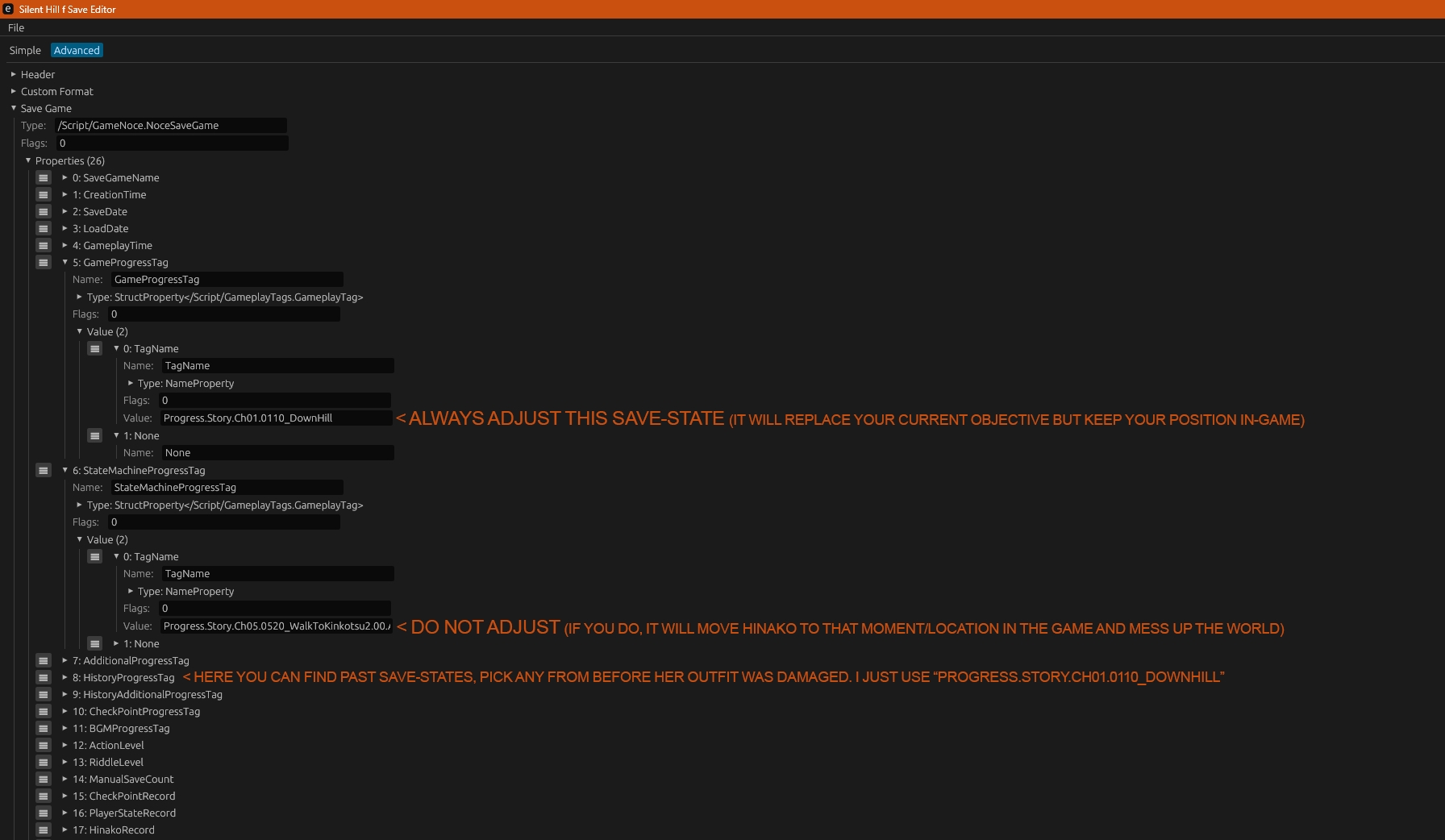
Please just follow the instructions on the image if you edit a save-file.
Anyways, doing so allows you to play with Hinako's default outfit. As mentioned above, it will break cutscenes by simply not playing them, you can still walk into the area where it is supposed to play out, as long as there aren't any doors blocking you from entering. If there are NPC's, you can also access and pose them with UUU (Mainly Shu and Rinko will be available throughout the Game).
The Save-state I used Progress.Story.Ch01.0110_DownHill